
How I Finally Sorted My Claude Code Memory | #98
How a single Substack post unlocked Claude Code's hidden memory system - and the full setup prompts to replicate it yourself.

For weeks - months, if I’m honest - I’d been meaning to sort out Claude’s memory. I’d been posting in Slack channels asking about approaches. In Lenny’s, work, trawling random blog posts. Plenty of people had thoughts. Multiple threads, multiple suggestions, with none shining through as a clear winner.
A lot of what I was seeing was hard to follow - not because the ideas were bad, but because the implementations were opaque. Black boxes sitting in ~/.claude/ doing things I didn’t fully understand. I don’t love that. If I can’t see how something works, I’m reluctant to depend on it. And there was something else nagging at me too: Claude keeps finding its own solutions to these problems.
Overly investing in a custom setup built outside of native Claude functions like CLAUDE.md means you might be solving a problem that Claude is already solving - or about to. You could be setting yourself back.
Call it perfectionism dressed up as research.
Either way, I kept not doing it.
There’s a folder at ~/.claude/projects/ that I’d noticed filling up over recent months. Files were appearing in there as I worked. I figured it was something to do with session history, and I hadn’t stopped to find out. I made a mental note a few times to look into it. I didn’t.
What Pawel shared
I was on Substack when Pawel Huryn’s post came up. Pawel runs The Product Compass - if you’re not following him, you should be - and this one had 405 likes and 48 restacks at time of writing. He earned every one of them.
The idea is simple: add an instruction to your CLAUDE.md that tells Claude to write useful things down as it learns them, organise them into files, and read them back at the start of each session. Here’s the post he shared, and the more advanced structured version of the prompt - which is the one I went with:
## Memory Management

Maintain a structured memory system rooted at .claude/memory/

### Structure

- memory.md — index of all memory files, updated whenever you create or modify one
- general.md — cross-project facts, preferences, environment setup
- domain/{topic}.md — domain-specific knowledge (one file per topic)
- tools/{tool}.md — tool configs, CLI patterns, workarounds

### Rules

1. When you learn something worth remembering, write it to the right file immediately
2. Keep memory.md as a current index with one-line descriptions
3. Entries: date, what, why — nothing more
4. Read memory.md at session start. Load other files only when relevant
5. If a file doesn't exist yet, create it

### Maintenance

When I say "reorganize memory":
1. Read all memory files
2. Remove duplicates and outdated entries
3. Merge entries that belong together
4. Split files that cover too many topics
5. Re-sort entries by date within each file
6. Update memory.md index
7. Show me a summary of what changed
What made this one stick when other approaches hadn’t was the format. It wasn’t a thread to read. It wasn’t an architecture to design before you could start. It was a prompt. Drop it in, done.
Within a few minutes of dropping in this version - the one with folders for tools/, domain/, and general.md - something happened that I wasn’t expecting at all.
Claude looked at those files I’d noticed accumulating in ~/.claude/projects/. And it reorganised them.
Side note: Auto memory shipped in v2.1.59 on 26 February 2026 - about a week before I wrote this. If you’re on a personal Pro or Max plan you’re likely already on it. If you’re on an enterprise plan, your organisation may have auto-updates disabled - run
claude doctorin your terminal to check your version and update status.It’s scoped per project - one memory directory per git repository, or per working directory if you’re outside a git repo. The folder names in
~/.claude/projects/are just your paths with slashes replaced by hyphens, so/Users/john/projects/my-appbecomes-Users-john-projects-my-app.Sort by recently modified - anything touched after 26 February should have a
memory/folder inside if auto-update was on.If you haven’t looked yet, go check. Claude may already have been quietly keeping notes on your work - something I didn’t know was happening myself.
The files I’d assumed were session history turned out to be more than that. Tucked in alongside them was a memory/ folder - Claude had already started building notes on my projects in the week since the feature shipped, and once I gave it a framework to work with, it had something real to apply it to. A week of quietly accumulated context, already there waiting for someone to organise it.
Which is when I saw the real problem
Having it working immediately surfaced something I’d been half-aware of for a while.
I have a lot going on in my Claude Code setup - agents, skills, custom commands, hooks, integrations with Jira, Snowflake, Confluence, Slack - months of configuration, all built up gradually.
Every time I solved something in one part of the setup - the right way to authenticate with Confluence, an exact format for a Jira custom field, a Snowflake schema detail I have to work around - I ended up needing to apply that same fix in twenty other places too. More often than not I didn’t actually implement the change everywhere, and only fixed things as I encountered them, which meant the solution drifted slightly each time. Doing things in dribs and drabs like this, with the speed of updates to Claude, leaves a bunch of different functionality or tools trying to solve for the same problem.
A flat memory.md wouldn’t solve this cleanly either - it would just be the same large CLAUDE.md file pattern most of you have already experienced. It gets appended to every session and eventually becomes a sprawling document that Claude loads whether it needs half of the context or not. The right knowledge loading at the wrong time, or not loading at all because it’s buried.
More memory is not the answer. Better architecture is.
The structured version - the one with subdirectories for different categories of knowledge - solves this properly.
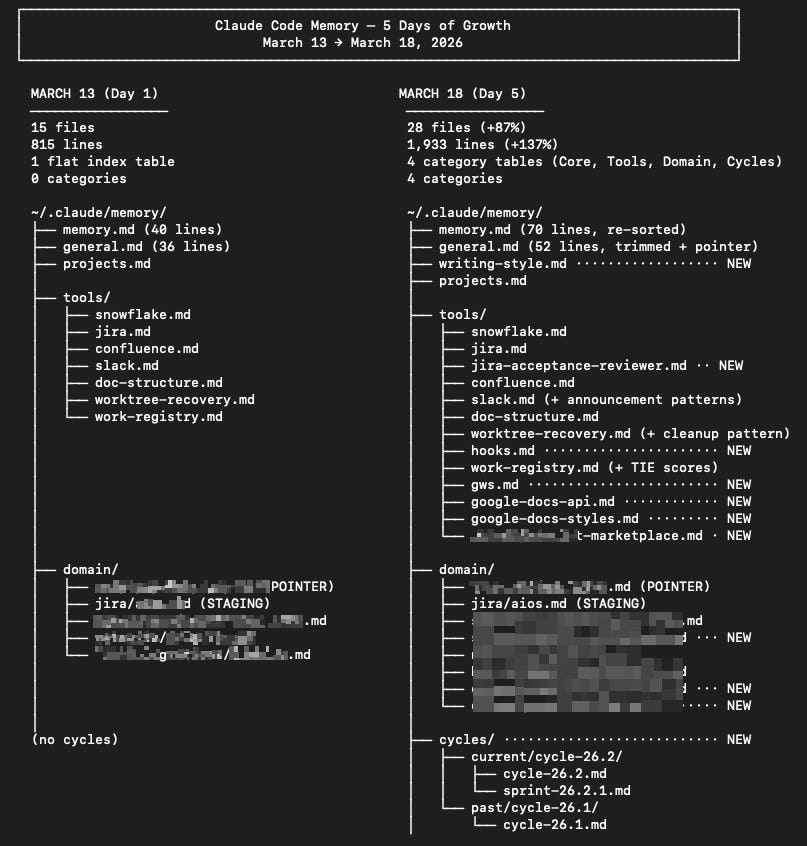
The structure I landed on
~/.claude/memory/
  memory.md           <- index (read at session start)
  general.md          <- cross-project conventions
  tools/
    snowflake.md
    atlassian.md
    slack.md
  domain/
    {product}/
      {product}.md
    {project}/
      {project}.md
memory.md is the index - one line per topic file, read every session.
general.md holds things that apply everywhere: naming conventions, and workflow preferences. I’ve since pulled writing preferences into its own file too - once you start publishing regularly, it earns its own space.
tools/ is where tool-specific knowledge lives - the exact way I’ve configured each integration, the quirks I’ve found, what works and what doesn’t in my specific setup. How Confluence authentication actually behaves. What the Atlassian CLI can and can’t do. Things that would take ten minutes to explain from scratch every time.
domain/ is where things get more interesting.
This is the most important part of the structure, and the one with the most room to grow. When you start working in a new domain - a product area, a codebase, a feature, a business process - that knowledge goes into domain/{topic}/. It builds up over time as you work: the gotchas, the edge cases, the context that takes you weeks to accumulate.
But the real potential here is sharing. If you can sync domain files with teammates, subject matter experts can contribute their hard-won context directly. That knowledge becomes a living file - not documentation nobody reads, but the specific, granular detail that Claude actually needs to be useful in that domain. The boundaries of a domain only get tighter the more specific you get.
At some point there’s enough to package as a skill - a reusable plugin that can be invoked across any project. For a product I work on, the domain knowledge is now a full skill, and it gets updated constantly. When the memory file gets too large for itself, I raise a pull request to either promote it into a skill or add it as an addendum to one that already exists.
The memory entry itself becomes a pointer. Three lines pointing at the skill. The knowledge lives in the skill. The memory file just says where to find it.
Global vs project memory
Global memory at ~/.claude/memory/ holds knowledge that applies across everything - tools, conventions, credential patterns. Project memory at ~/.claude/projects/{project}/memory/MEMORY.md holds knowledge specific to one repo - the active tickets, the doc structure, patterns specific to that codebase.
I have a standing instruction in my CLAUDE.md to check whether MEMORY.md exists at the start of any session in a new project - and if it doesn’t, create the standard structure. The first time Claude opens a new project, it sets up the scaffolding. After that, it fills it in as it goes. The hook in Part 2 acts as the backup - it injects memory automatically before every tool call, so even if the instruction gets missed, the context is still there.
The bit I got wrong first
My first version put the trigger table - the routing rules that tell Claude which topic files to load for which context - inside the project MEMORY.md. That’s the file auto memory loads at session start, so it seemed like the right place. If I wanted something read automatically, that’s where it should live. Made sense at the time.
It’s exactly wrong.
The project MEMORY.md only loads the first 200 lines at session start. That’s not a preference - it’s how Anthropic have built the feature. Burn 20 of those lines on routing rules and you’ve given up 10% of your budget on boilerplate that could live somewhere else. Specifically: in CLAUDE.md, which loads in full. Routing rules are instructions, not learnings. They belong in CLAUDE.md, not in the auto memory file.
While sorting that out, the question of reliable loading came up. Claude Code hooks are scripts that fire automatically at specific points in a session - before a tool runs, after a response, at session start, etc. I wanted something that would inject my project memory automatically, without relying on Claude remembering to read it. A backup for when the instruction gets missed.
The hook needed to fire once per session context - including for new subagents, which each get their own process.
One small hook technical detail worth flagging:
CLAUDE_SESSION_IDdoesn’t exist in hooks - I learned that the hard way. The right identifier isos.getppid(). I’ll cover the full hook setup in the Try it yourself section below.
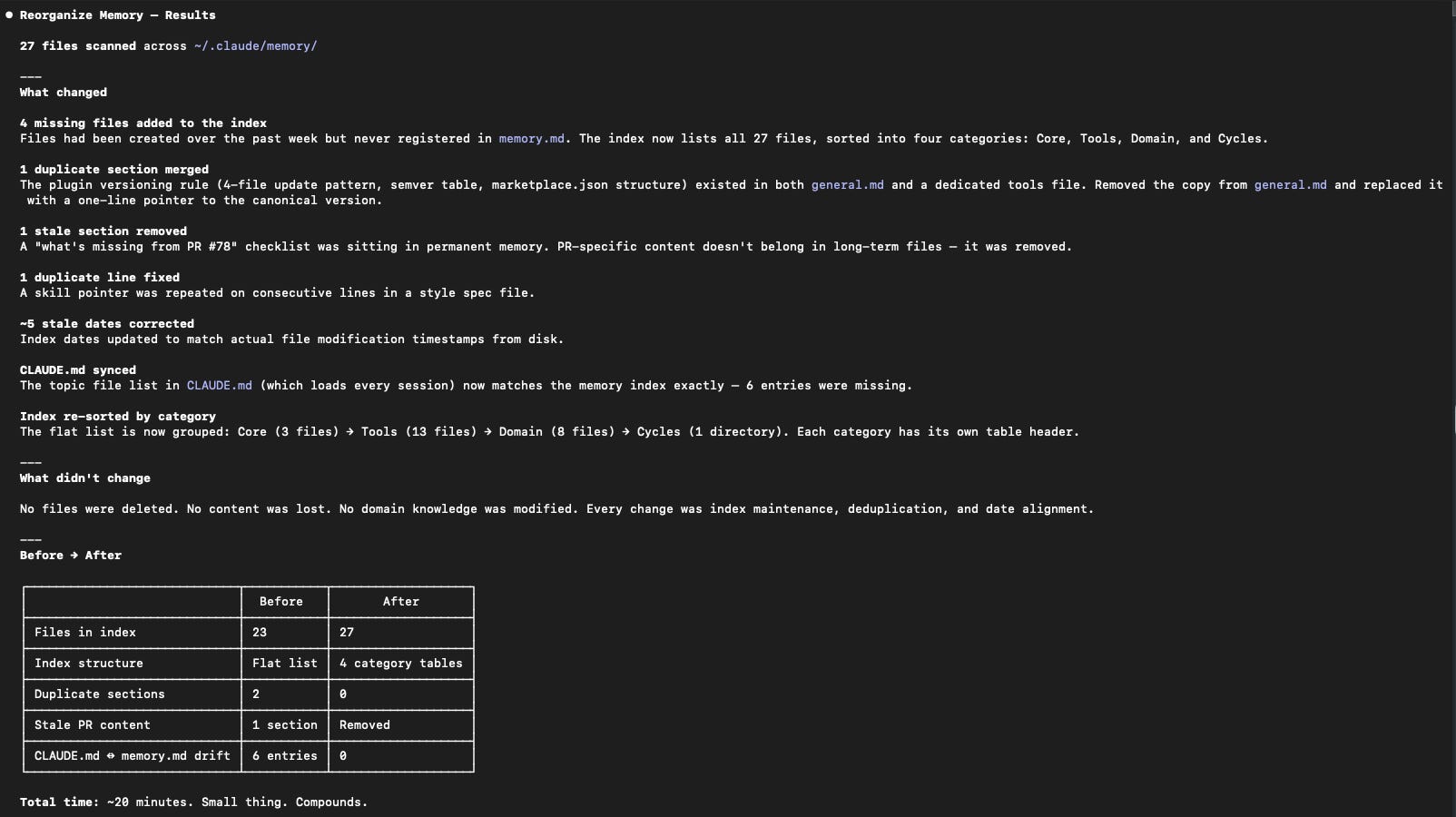
Twenty minutes later the structure was clean.
Once the structure was in place, I switched into plan mode and ran “reorganize memory”. Plan mode matters here - you’re potentially changing a lot of files, and you want to see what Claude is going to do before it does it. Nothing untoward ending up in important places.
~/.claude/CLAUDE.md went from 189 lines to 63 lines. Seven new files in ~/.claude/memory/ covering tools and domain knowledge that had previously been crammed inline. Three new files in project memory for the repo I’m currently working in. A pointer entry for a product I work on. An auto-init instruction so every new project gets the structure from day one.
One thing worth doing while you’re at it: create a git repo for your ~/.claude/ folder. If you’re keeping it private, you can commit everything. If you’re sharing it, ask Claude what to gitignore - it’ll know what’s sensitive and what isn’t.
The bloated CLAUDE.md that had been loading 155 lines of dense reference content on every single session is now 63 lines pointing at files that load when they’re needed.
Small thing. Compounds.
Try it yourself
You can start with Pawel’s basic version above if you like. It’s a nice entry point - it works in about ten minutes and the improvement is immediate. You don’t need the folder structure to get value from it.
I personally prefer mine, but it is a big longer and more involved from a prompt aspect. The time taken is still the same, but Pawel’s is enough for everyone and that’s what he is going for and he excels with his blog. I love tweaking stuff for UX reasons, and this is one of those.
If you’re in the position I was in - lots of tools, context that needs to live in more than one place, knowledge that keeps needing to be re-entered - the structured version is worth the extra setup. Pawel’s prompt got me started, but what’s below is what I actually have in my CLAUDE.md now, after a few days of refinement.
Both prompts run in plan mode - Claude shows you what it’s going to do before it touches anything, and nothing gets overwritten without asking.
Part 1: Memory structure
Start here. Sets up the memory architecture and teaches Claude Code how to use it. No hooks, no changes to settings.json.
You can either copy all the text from here, or between the lines below.
--- Copy below this line for Part 1 ---
Set up a structured, persistent memory management system for Claude Code. Run in plan mode, show me the plan, then execute.
Before starting
Create tasks for each step below using TaskCreate, then mark each in_progress before starting it and completed when done:
Create global memory directory structure
Update CLAUDE.md
Initialise project MEMORY.md files
Rule: if any file already exists and would be modified or removed, use AskUserQuestion first. Show the current content and the proposed change. Do not modify without explicit confirmation.
1. Global memory directory structure
Create ~/.claude/memory/ with the following files if they do not already exist:
~/.claude/memory/memory.md - the index file:
# Memory Index

Read this file at session start. Load specific topic files only when relevant.

| File | Description | Last updated |
|------|-------------|--------------|
| `general.md` | Cross-project conventions and preferences | {today} |

## Domain Knowledge Lifecycle

1. Staging - knowledge accumulates in domain/{name}/
2. Promotion - enough knowledge exists to package as a plugin/skill
3. Pointer - after promotion, the memory file becomes a pointer to the plugin
~/.claude/memory/general.md - the cross-project conventions file:
# General - Cross-Project Conventions

## Writing & Naming Conventions

(Populate as you go)

## Workflow Preferences

(Populate as you go)
Also create empty directories ~/.claude/memory/tools/ and ~/.claude/memory/domain/ if they do not exist.
2. Update CLAUDE.md
If ~/.claude/CLAUDE.md does not exist, create it as an empty file first.
For each section below, check if the header already exists. If it does, leave it alone. If it does not, add it after the last existing section.
Section: Memory Management
## Memory Management

Maintain a structured memory system rooted at .claude/memory/

### Structure

- memory.md — index of all memory files, updated whenever you create or modify one
- general.md — cross-project facts, preferences, environment setup
- domain/{topic}.md — domain-specific knowledge (one file per topic)
- tools/{tool}.md — tool configs, CLI patterns, workarounds

### Rules

1. When you learn something worth remembering, write it to the right file immediately
2. Keep memory.md as a current index with one-line descriptions
3. Entries: date, what, why — nothing more
4. Read memory.md at session start. Load other files only when relevant
5. If a file doesn't exist yet, create it
6. Before removing or modifying any existing memory entry, use AskUserQuestion to confirm
   with the user — show the current content and the proposed change

### Maintenance

When I say "reorganize memory":
1. Read all memory files
2. Remove duplicates and outdated entries
3. Merge entries that belong together
4. Split files that cover too many topics
5. Re-sort entries by date within each file
6. Update memory.md index
7. Show me a summary of what changed
Section: Global Memory
## Global Memory

Read `~/.claude/memory/memory.md` at session start. Load specific topic files only when relevant.

Topic files:
- `~/.claude/memory/general.md` — cross-project conventions and preferences
Section: Global Memory Reference Rule
## Global Memory Reference Rule

Whenever you work in a project and read (or create) its MEMORY.md, check that it contains a
## Global Memory section. If it does not, add it near the top, after the H1.

The section must be a SHORT POINTER only. Do NOT copy the topic file list into project MEMORY.md.
The list lives in CLAUDE.md (single source of truth). Project MEMORY.md has a 200-line budget —
use it for project knowledge, not boilerplate.

Canonical template for project MEMORY.md ## Global Memory section:

## Global Memory

Read `~/.claude/CLAUDE.md` for memory rules and topic files.

When a new file is added to ~/.claude/memory/:
- Add it to the ## Global Memory topic file list in ~/.claude/CLAUDE.md only
- Do NOT update individual project MEMORY.md files
Section: Repo Memory Auto-Init
## Repo Memory Auto-Init

At session start in any project, check for MEMORY.md in the project memory directory
(~/.claude/projects/{mapped-path}/memory/). If it does not exist, create it:

# {Project Name} - Project Memory

## Global Memory

Read `~/.claude/CLAUDE.md` for memory rules and topic files.

## Project Notes

(Populated as you work in this project)
Section: Worktree Memory Auto-Init
## Worktree Memory Auto-Init

When starting a session in a worktree (working directory path contains --claude-worktrees-):
1. Check for memory/MEMORY.md in the worktree's Claude project dir
2. If missing, create it with: the standard stub (project name, branch, parent project)
   + ## Global Memory section + ## On Merge reminder
3. Add the worktree row to the Active Worktrees table in ~/.claude/memory/projects.md
Section: Worktree Merge Memory Sync
## Worktree Merge Memory Sync

When a worktree is merged or about to be deleted:
1. Read the worktree's MEMORY.md
2. Compare against the parent project's MEMORY.md
3. If the worktree contains decisions, patterns, or facts not in the parent, prompt the
   user to promote them before proceeding
4. Only after the worktree directory has been confirmed deleted: remove the worktree row
   from the Active Worktrees table in ~/.claude/memory/projects.md
Section: Domain Knowledge Lifecycle
## Domain Knowledge Lifecycle

1. Staging — knowledge accumulates in ~/.claude/memory/domain/{name}/
2. Promotion — enough knowledge exists to package as a plugin/skill
3. Pointer — after promotion, the memory file becomes a pointer to the plugin;
   content lives in the plugin

When an update is needed to a promoted domain, note it in the memory file so an issue
can be created on the plugin repo.
3. Initialise project MEMORY.md files
Scan ~/.claude/projects/ for existing project directories. For each one:
a) If memory/MEMORY.md does not exist: create it with the stub template above.
b) If memory/MEMORY.md exists and contains a ## Global Memory section with a trigger table: replace that section with the 2-line pointer. Do not modify any other content.
c) If memory/MEMORY.md exists with a correct pointer already: leave it alone.
--- Copy as far as this line for Part 1 ---
End of Part 1. Once Claude has built the plan for Part 1, switch into plan mode again and run “reorganize memory” to tidy up what Claude Code has already built.
A note on Atlassian MCP: you’ll notice it’s not in my tools list. I banned it. It’s unreliable, it absolutely gobbles tokens, and it caused a corrupt data entry in one of my registries that poisoned a bunch of output files before I caught it.
I’ve migrated to ACLI and direct REST API for Jira, and direct REST API for Confluence - both are in my tools files. The painful part: most of my agents were built assuming the MCP. I haven’t migrated them yet. That’s a job for another weekend.
Part 2: PreToolUse hook (optional)
Run this after Part 1. This adds a hook that injects your project memory and global index before the first tool call of every session - including for new subagents. It survives context compression in long sessions. Two-file design: a bash wrapper (~5ms) gates a Python script so the overhead after the first call is negligible.
You can either copy all the text from here, or between the lines below.
Dependency: python3 must be on your PATH. Run which python3 in your terminal to confirm.
--- Copy below this line for Part 2 ---
Add automatic memory injection to Claude Code. Run in plan mode, show me the plan, then execute.
Before starting
Create tasks for each step below using TaskCreate, then mark each in_progress before starting it and completed when done:
Create PreToolUse memory hook files
Register hook in settings.json
Update ## Global Memory section in CLAUDE.md to reference the hook
Rule: if any file already exists and would be modified or removed, use AskUserQuestion first. Show the current content and the proposed change. Do not modify without explicit confirmation.
1. PreToolUse memory hook files
Create two files in ~/.claude/hooks/ (create the directory if it doesn’t exist).
~/.claude/hooks/pre-tool-memory.sh - the shell wrapper:
#!/bin/bash
FLAG="/tmp/claude-memory-loaded-$(ps -o ppid= -p $$ | tr -d ' ')"
[ -f "$FLAG" ] && exit 0
exec python3 ~/.claude/hooks/pre-tool-memory.py
~/.claude/hooks/pre-tool-memory.py - the memory injector:
#!/usr/bin/env python3
"""PreToolUse hook: inject project MEMORY.md on first tool call of this process context."""
import json
import os
import sys
from pathlib import Path


def main():
    try:
        ppid = os.getppid()
        flag_path = Path(f"/tmp/claude-memory-loaded-{ppid}")

        if flag_path.exists():
            sys.exit(0)

        flag_path.touch()

        project_dir = os.environ.get('CLAUDE_PROJECT_DIR', os.getcwd())
        mapped = project_dir.replace('/', '-').replace('.', '-')

        home = Path.home()
        memory_file = home / '.claude' / 'projects' / mapped / 'memory' / 'MEMORY.md'
        global_idx = home / '.claude' / 'memory' / 'memory.md'

        parts = []

        if memory_file.exists():
            lines = memory_file.read_text(encoding='utf-8').splitlines()[:200]
            parts.append(f"=== Project Memory: {project_dir} ===\n" + '\n'.join(lines))
        else:
            parts.append(f"(no project MEMORY.md at {memory_file})")

        if global_idx.exists():
            parts.append("=== Global Memory Index ===\n" + global_idx.read_text(encoding='utf-8'))

        output = {
            "hookSpecificOutput": {
                "hookEventName": "PreToolUse",
                "additionalContext": '\n\n'.join(parts)
            }
        }

        print(json.dumps(output))
        sys.exit(0)

    except Exception as e:
        print(f"pre-tool-memory: hook error: {e}", file=sys.stderr)
        sys.exit(0)


if __name__ == "__main__":
    main()
Make both files executable with chmod +x.
2. Register the hook in settings.json
Read ~/.claude/settings.json. If a PreToolUse key already exists inside hooks, add a new entry to it. If it does not exist, add the following block inside the hooks object (create hooks if it doesn’t exist):
"PreToolUse": [
  {
    "matcher": "*",
    "hooks": [
      {
        "type": "command",
        "command": "bash ~/.claude/hooks/pre-tool-memory.sh",
        "timeout": 5
      }
    ]
  }
]
3. Update ## Global Memory in CLAUDE.md
Read ~/.claude/CLAUDE.md. Find the ## Global Memory section. Replace its description line with:
Project MEMORY.md and this index are auto-injected before each tool call via PreToolUse hook
(~/.claude/hooks/pre-tool-memory.sh). Load specific topic files only when relevant.
--- Copy as far as this line for Part 2 ---
End of Part 2. If you’ve already run either prompt before, it’s safe to run again - Claude checks before creating or modifying anything, and won’t overwrite without asking.
What I ended up with in 5 days
Can you do it?
Of course. Before you run anything, check what Claude Code has already built in ~/.claude/projects/ - you might be surprised by what’s already there in the memory folders that exist. Then run Part 1, switch into plan mode and run “reorganize memory”, and add Part 2 when you’re ready for the hook.
Pawel recently posted a follow-up covering error logging and knowledge graduation - I’ve incorporated that into my own setup too above, so thanks Pawel. Worth a read if the domain lifecycle section above resonated. That maps to a different problem I’ve been sitting on since January. More on that soon.
If you found this useful, I’d love if you subscribed! I’m trying to build a bit of a following to try and help folks in the industry and make their jobs a little bit easier.
Related posts you might like:
#95 - Understanding Claude Code: Skills vs Commands vs Subagents
#96 - Building my Content Creation Agent Ecosystem, Part 1
The memory management system is part of what makes the content creation ecosystem in #96 work the way it does now. Worth a read if you haven’t seen it.
And if you want to share notes or ask questions, find me on LinkedIn, in Substack chat or drop a question on this post.